
The online DJ school for kids, teens & grown-ups
Learn to DJ. Drop the beat. Level up.
Two real virtual decks, a club-style mixer, scratching, effects and a beat maker, with step-by-step lessons, challenges and badges to keep you spinning. It all runs in your browser, and a grown-up sets it up.
- Nothing to download
- Parent-controlled profiles
- No ads, no chat
The DJ Studio
Real decks. Real skills. Zero downloads.
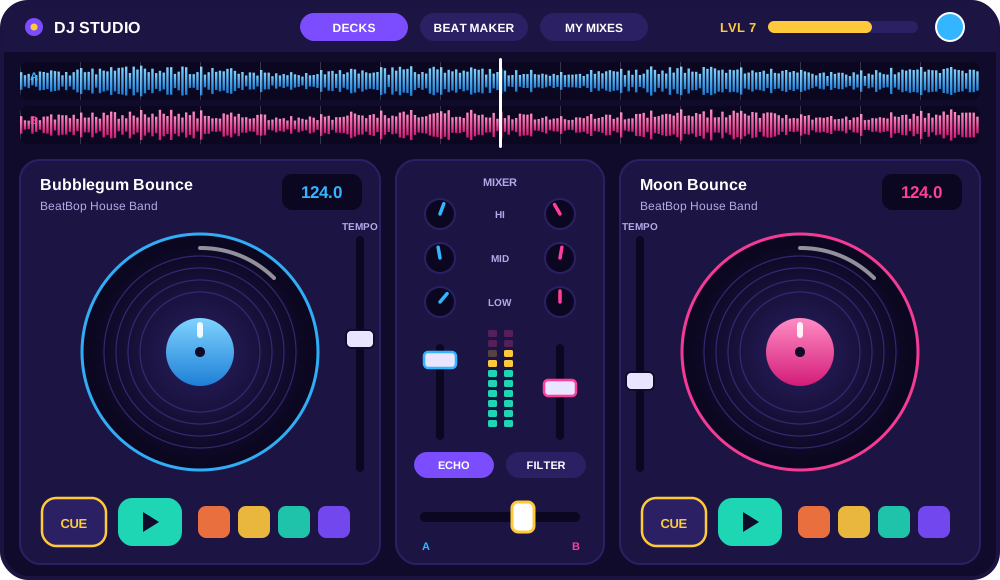
Our studio works like the gear in a real DJ booth, just friendlier. Little DJs get big buttons and a helper, and older DJs unlock every knob, fader and effect.
Two decks
Play, cue, loop and scratch two tracks at once, with waveforms and beat grids.
Mixer & EQ
Crossfader, channel faders and a 3-band EQ, laid out like a club mixer.
BPM & Sync
See every track’s tempo, learn to match beats by ear, or tap Sync.
Live effects
Echo, reverb, filter, flanger, bass boost and vinyl scratch, all tweakable live.
Sampler pads
Air horns, sirens, scratches, claps and crowd cheers, ready to fire on the beat.
Beat maker
Program kicks, snares and hi-hats on a step grid and play them over your mix.
Record your mix
Hit record, perform your set, then save it to your own mix library.
Music library
Hip-hop, house, pop, disco, kids’ tunes, drums and loops, all with clean BPMs.
How it works
From first tap to first mix in three steps

A grown-up signs up
Parents create a free family account and add a DJ profile for each child, with no child email addresses needed.
Pick your DJ character
Choose an avatar and jump in. The studio adapts to your age, from big friendly buttons to the full pro console.

Learn, mix, level up
Guided lessons show you exactly what to press. Earn XP, unlock badges and record mixes to show the family.
DJ Academy
20 lessons, from first spin to a full DJ set
Every lesson mixes a short explainer with hands-on practice. The studio lights up the exact button to press, then a quick quiz locks in what you learned.
Find your groove
- 1Introduction to DJing
- 2Understanding the DJ console
- 3Playing your first track
- 4Music and rhythm
- 5Introduction to BPM
- 6Using the mixer
- 7The crossfader
Start mixing
- 8Mixing two tracks
- 9Beat matching
- 10Using cue points
- 11Creating loops
- 12DJ effects
- 13Creating transitions
- 14Your first DJ mix
Own the booth
- 15Advanced beat matching
- 16Creative mixing
- 17Advanced effects
- 18Building a DJ set
- 19Recording a performance
- 20Final performance challenge
Made for every age
One studio that grows with you
Parents pick the right mode for each child, and every mode uses the same real DJ skills.
5–8
Junior mode
Big chunky controls, auto-sync and DJ Kiddo guiding every step. Colourful, simple and very hard to get wrong.
9–12
Explorer mode
BPM, beat matching, loops, hot cues and effects open up as you level up, with challenges to keep it fresh.
13+
Pro mode
The full dual-deck console for teens and adults: EQ kills, 8 hot cues, pitch bend, every effect and long recordings.
Rewards
Earn XP. Unlock badges. Become a Superstar DJ.
Lessons, daily and weekly challenges, and real mixing moves all earn XP. Level up to unlock new DJ characters and studio themes.

First Spin
Play your very first track
Beat Beginner
Finish the Beginner course
Mixing Master
Finish the Intermediate course
Scratch Star
Scratch 25 times on the decks
Sound Creator
Save your first beat
Superstar DJ
Complete all 20 lessons
- L1Rookie
- L5Groove Maker
- L9Mix Master
- L13Headliner
- L17Superstar DJ
For parents
Grown-ups stay in control
BeatBopLab is built around a parent account. You decide who plays, what they can use and how long they spend. We collect as little as possible.
Parent-managed profiles
Children use a nickname and avatar, with no email, password or payment access. Add an optional PIN per profile.
No ads, no chat, no strangers
Kids can’t message each other or share publicly. Mixes stay private to your family.
Screen-time and feature controls
Set daily minutes and switch recording, the beat maker or sound effects on or off for each child.
Progress reports
See lessons finished, minutes mixed, badges earned and how each child is improving.
Music & sounds
A music library made for mixing
Original, kid-friendly tracks with clean tempos and clear beats, perfect for practising. Plus drum loops, basslines, synths and a whole box of sound effects.
- Hip-hop
- House
- EDM
- Pop
- Disco & Funk
- Instrumental
- Kids’ songs
- Drums & percussion
- Basslines
- Synth loops
- Vocal samples
- Intros & outros
- Air horns 📯
- Record scratches
- Crowd cheers
- Bass drops
Membership
Start free. Go Premium when you’re hooked.
Free
A$0 forever
- The DJ Studio with two decks and mixer
- Beginner lessons 1–7
- Starter tracks and 8 sound effects
- Save up to 3 mixes
- 1 child profile
Best for families
Premium Family
A$9.99 / month or A$79.99 / year
- All 20 lessons and advanced challenges
- The full music and sound library
- Every effect, 8 hot cues and the beat maker
- Up to 50 saved mixes per child
- Up to 5 child profiles and detailed reports
Questions
Good to know
What age is BeatBopLab for?
Anyone from about 5 years old up to adults. Junior mode keeps things simple for little DJs, Explorer mode suits ages 9–12, and Pro mode gives teens and grown-ups the full console.
Do we need DJ equipment or to install anything?
No. The studio runs in a modern web browser (Chrome, Edge, Firefox or Safari) on a computer or tablet. Headphones make it more fun, but speakers work too.
Is it safe for my child?
Yes. A parent owns the account, and children use a nickname and avatar only. There’s no chat between users, no advertising, and mixes are private to your family. You can download or delete your family’s data at any time.
Can my child accidentally buy something?
No. Children never see a checkout. Premium features show a friendly “ask a grown-up” message, and only the parent account can upgrade.
Will there be an app?
Yes, iOS and Android apps are on the roadmap. They’ll use the same account, so lessons, levels and saved mixes come with you.
Ready to drop your first beat?
Jump into the studio now, no sign-up needed. When you’re ready to save mixes and earn badges, a grown-up can set up a free account in two minutes.